 ThinkGPT
Free AI Image Describer & Analyzer
Turn any picture into text instantly! Whether you need SEO alt text, Midjourney prompts, or detailed visual analysis, our free AI handles it all.
Upload an Image
Drag & drop or click to upload an image
Our AI will analyze and describe your image instantly
JPG, PNG, WEBP, HEIC, HEIF · Max 20MB
✖
Upload Multiple Images
Drag & drop or click to upload (2–9 images)
We’ll analyze each image and generate results instantly
JPG, PNG, WEBP, HEIC, HEIF · Max 20MB per image
Upload Multiple Images
0/9 images uploaded
Image Describer Options
Multi-select Mode
Enable to select up to 5 description typesDeep Mode
AI generates exploratory questionsLanguage
What is the AI Image Describer?
The AI Image Describer by ThinkGPT is an advanced visual intelligence tool that translates images into highly detailed text. It doesn't just tell you what's in a photo—it understands context, reads extracted text, and generates actionable outputs. With support for over 20 specific tasks—including writing fashion descriptions, generating marketing copy, creating AI art prompts (Flux, Stable Diffusion), and identifying emotions—it is the ultimate all-in-one image analysis tool for creators, marketers, and developers.
Analyze Single or Multiple Images Instantly
Unlike basic tools that limit your capabilities, our image description generator offers unparalleled flexibility without forcing you to create an account.
Single Image Mode: Upload a photo (up to 20MB) and select up to 5 processing options at once. Get 3 different versions of your generated text so you can choose the perfect output.
Multiple Images Mode: Upload 2 to 9 images simultaneously to compare visuals, find differences, analyze a sequence, or summarize a collection. It's fast, private, and unlimited.
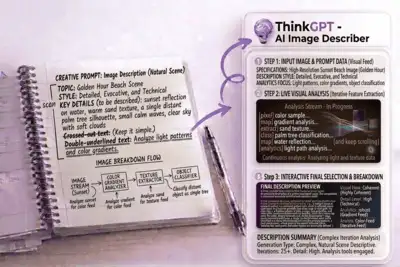
How to Use the AI Image Describer
Our tool is designed for speed and simplicity. Follow these three easy steps to extract insights, prompts, and descriptions from any photo in seconds.
Step 1
Upload or Paste URL
Drag and drop your files, click to upload, or simply paste an image URL. You can upload a single image or switch to the "Multiple Images" tab to upload up to 9 files (Max 20MB per image) in JPG, PNG, WEBP, or HEIC formats.
Step 2
Select Your AI Options
Choose your desired language and select up to 5 description types—such as "Generate ALT Text," "Midjourney Prompt," or "Extract Text." Want more details? Toggle on Deep Mode for exploratory questions and advanced analysis.
Step 3
Get 3 Output Versions
Within seconds, our AI will generate 3 unique versions of your requested description. Review the variations, choose the one that fits your needs best, and instantly copy or download the text for your project.
Key Features & Capabilities
From basic photo captions to deep AI logic, our tool offers a massive suite of features designed to save you time and boost your productivity.
Multiple Image Comparison
Don't just analyze one photo. Upload up to 9 images to find differences, identify common themes, analyze a timeline progression, or summarize a visual collection instantly.
AI Art Prompt Generator
Found an image style you love? Reverse-engineer it! Automatically generate highly optimized text prompts for Midjourney, Flux, and Stable Diffusion to recreate the aesthetic, or refine your ideas from scratch using our AI Prompt Generator.
SEO & Marketing Tools
Boost your website's ranking. Automatically generate SEO-friendly ALT text, extract relevant tags and keywords, and write high-converting product descriptions or marketing copy.
Deep Analysis Mode
Go beyond basic descriptions. Enable Deep Mode to generate exploratory questions, analyze photography and art styles, detect emotions and moods, or even turn an image into a creative narrative alongside our AI Story Generator.
Multi-Select Processing
Why run a tool five times? Select up to 5 different outputs at once (e.g., get a brief description, extract text, AND generate a title) all from a single image upload.
No Login & 100% Free
Say goodbye to paywalls and sign-up forms. Use our tool as many times as you want, with absolutely no usage limits. Generate unlimited text from images instantly.
Who Can Use the AI Image Describer?
Whether you are optimizing a website, generating AI art, or managing social media, this tool is built for your workflow.
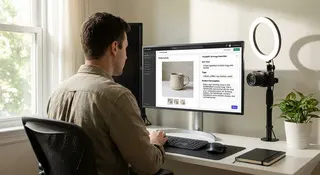
E-commerce & Marketers
Upload product photos to instantly generate SEO ALT text, tags, and compelling product descriptions that drive traffic and increase online sales.

Social Media Managers
Never run out of post ideas. Turn raw images into engaging captions, detect the mood of a photo, and generate trending hashtags effortlessly.
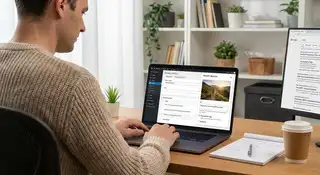
Bloggers & SEO Experts
Ensure your website is fully accessible and optimized for Google Image Search by automating your image ALT text and title generation.
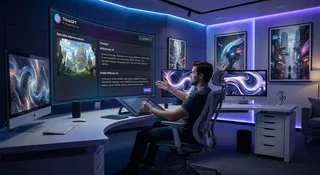
AI Artists & Designers
Use visual reverse-engineering to extract detailed prompts for Midjourney or Stable Diffusion. Analyze art styles, photography lighting, and fashion outfits.
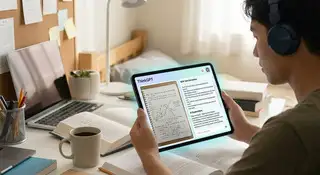
Students & Educators
Easily extract text from screenshots of notes, analyze complex diagrams, or pair this with our AI Answer Generator to get instant solutions from your uploaded study materials.
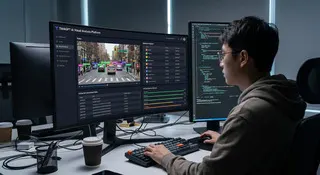
Developers & Data Enthusiasts
Quickly test object recognition, run content safety checks, and extract structured data from images without writing a single line of code.
Trusted by Thousands of Users Worldwide
Join professionals, creators, and developers who rely on our fast, accurate, and free AI image analysis tools every single day.
Based on 890 Reviews
Users
Schools & Teams
Countries







Loved by Creators, Marketers, & Developers
See how our free AI Image Describer is helping professionals save time, boost SEO, and spark creativity every single day.

“I use this mostly for generating SEO alt text for my blog images. It's fast, accurate, and I love that I don't have to create an account to use it.”
Alex Johnson
Content Creator

“Uploading 4 or 5 product photos at once and getting descriptions for all of them is super handy. It really speeds up adding new items to my shop.”
Sarah Patel
Etsy Seller

“Honestly impressed by how well it breaks down art styles. I drop in a reference picture and it gives me a perfect Midjourney prompt to work with.”
Olivia Parker
Digital Artist

“Getting text out of lecture screenshots used to take me forever. Now I just paste the image and copy the text. Super easy and works every time.”
Priya Desai
University Student

“It's nice that it gives you three different caption choices per upload. Usually, one of them is exactly the vibe I need for my Instagram posts.”
Robert Davis
Social Media Manager
“So many tools make you sign up or pay after just one use. This one is actually free and limitless. Really appreciate the clean, simple interface.”
Laura Smith
Web Designer
Frequently Asked Questions About Image Describer
Have questions about how to convert your images to text? Find everything you need to know about our free AI image analyzer, supported formats, and generation capabilities below.
Yes! Our tool is 100% free to use with absolutely no usage limits. You do not need to create an account, log in, or provide a credit card. Simply upload your image and get instant AI descriptions.
You can upload photos, artwork, diagrams, and screenshots. We support all major image formats including JPG, PNG, WEBP, HEIC, and HEIF. The maximum file size allowed is a massive 20MB per image.
Yes, this is one of our most powerful features! Switch to the Multiple Images tab to upload between 2 to 9 images at the same time. You can ask the AI to Compare Images, Find Differences, Analyze a Sequence, or Summarize a Collection.
You can select up to 5 different outputs simultaneously. Options include generating SEO ALT Text, Midjourney or Stable Diffusion prompts, Marketing Copy, Object Recognition, Emotion Detection, Fashion Outfits, and even turning an image into a creative story.
Absolutely. All uploaded images are processed securely and are never permanently stored on our servers. Your data is only held temporarily to generate your text results and is automatically deleted immediately after processing.
Our tool uses highly advanced AI vision models to ensure top-tier accuracy. To guarantee you get exactly what you need, the AI generates 3 different versions of the requested text for every upload. You can review all three and copy or download the one that fits best.
Yes! You are not limited to English. Before generating your results, simply use the dropdown menu to select your preferred language, and the AI will analyze the image and write the descriptions, prompts, or tags natively in that language.
Explore More AI Tools by ThinkGPT

AI Math Solver – Instant Step-by-Step Solutions

AI Answer Generator: Instant Answers from Text & Images

Question AI – Instantly Ask Any Question for Fast, Accurate Answers

Word Problem Solver: Solve, Graph & Practice with AI

Accounting AI Solver – Solve Journal Entries & Balance Sheets

Physics AI Solver – Solve Physics Problems Instantly

Chemistry AI Solver: Balance Equations & Predict Reactions from Images

Geometry AI Solver – Get Step-by-Step Solutions

AI Homework Helper: Learn & Succeed with Step-by-Step Guidance

AI Prompt Generator: Create Effective Prompts for Any AI Model

Economics AI Solver: Learn with Step-by-Step Micro & Macro Explanations

Biology AI Solver: Instant Solutions for Diagrams, Genetics & Cells

AI Chat: Your Free Conversational AI for Ideas & Planning
Photomath Online: Free Step-by-Step Photo Math Solver

Free AI Poem Generator Online

AI Story Generator Free – Create Stories Your Way

Free AI Paragraph Generator Online

Free AI Code Generator Online

Free AI Image Detector Online
Turn Any Image Into Text Instantly
Start using our free AI Image Describer to generate SEO alt text, AI art prompts, and detailed visual analysis in seconds — 100% free with no sign-up required.